
 Image 1 of 5
 Image 2 of 5
 Image 3 of 5
 Image 4 of 5
 Image 5 of 5
MacOS requires most apps to be:
Signed by a registered developer
Notarized by Apple
During beta development, many independent and early-stage apps aren’t notarized yet. That’s why macOS flags them.
Try opening the app normally
Double-click The Node Network.
You’ll see a warning saying it can’t be verified.
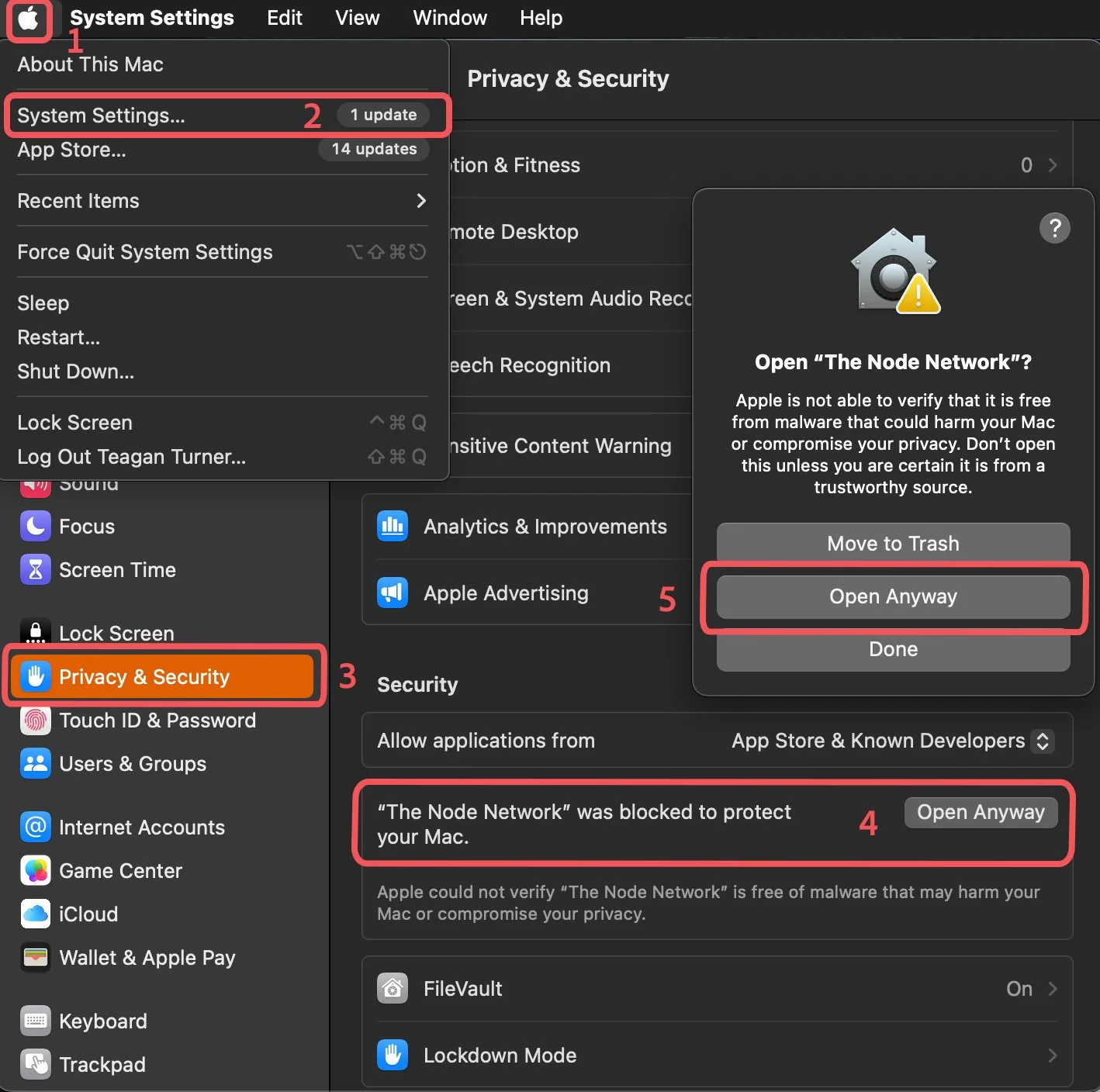
Open System Settings
Click the Apple menu () in the top-left.
Select System Settings…
Go to Privacy & Security
In the sidebar, click Privacy & Security.
Find the blocked app message
Scroll down to the Security section.
You’ll see:
“The Node Network was blocked to protect your Mac.”
Click “Open Anyway”
Press Open Anyway.
Confirm when prompted.
Launch normally after that
The app will now open.
Future launches won’t be blocked.